Showing posts with label iPhone. Show all posts

Adventures and Roses iPhone Backgrounds | Free Download


I've been really craving an escape to the mountains and/or woods like mad. I'll just have to keep wanting for a bit — we won't have the opportunity to go off on a camping trip until later this summer. I'm trying to remind myself that there are still plenty of escapes and simple adventures near me. I am so lucky to live in a beautiful city like Boise, where the outdoors and indoors tend to bleed into one another more often than not. I created this little reminder for my phone using a phrase I have hanging in my home and using images taken on in-town or just-up-the-hill adventures. I love the summery, escapist result.

Please feel free to use any of the of the images above to give your phone a fresh and colorful new look. Just view my blog on your phone, then click the image above you want to use to view a higher resolution. Then, hold down on the image, select save image, and find it in your camera roll from there. You know the drill :)

What are some adventures you enjoy without leaving town?

xx Emorie

This download is free for personal use only. It may not be used for commercial or promotional purposes without my written consent. Credit me if you share it elsewhere. Thank you.

Confidence iPhone and Desktop Background | Free Download


I made a new background for my phone this morning and wanted to share the love with you! I refresh my screens regularly; at least once a month for my desktop and nearly every week for my iPhone. With how often I am getting on my phone or staring at some sort of screen throughout the day,  it only makes since to take that often overlooked background space and use it to my advantage. I often create backgrounds to reflect my mood that week, or use it as an opportunity to give myself a simple reminder. Last week, I had the words "seek adventure and happiness" on my phone's lock screen, but these words from BeyoncĂ© feel relevant to me right now. I have a lot of changes coming, a lot of fun projects I'm working on, and some opportunities I plan on grasping fully. This confidence reminder is perfect for me to glimpse often throughout the day on my different devices.

If you'd also like a little confidence reminder on your screen, you can download the backgrounds using the Dropbox links below (for use on your computer or phone).

+ Desktop download: with quote | without quote
+ iPhone download: with quote | without quote

Enjoy!
xx Emorie


This download is free for personal use only. It may not be used for commercial or promotional purposes without my written consent. Credit me if you share it elsewhere. Thank you.

Geometric Spring/Summer iPhone Backgrounds | Free Download


I wanted to stop in really quick with something fun for you! Things have been rather quiet over here, and they will likely continue to be for awhile, as I'm busy busy busy with other projects. I'm really excited about some of the work I'm doing, and I'll have more to share with you soon as well as (eventually) a bunch of changes here. But, wow, I am getting ahead of myself. I've been playing around with lots and lots of patterns lately, so I'd thought I'd share some with you.  I adore spring colors, so I went a little crazy. And of course, ice cream, as it has been a staple in my diet lately (I kid... or do I?) thanks to the sudden increase in temperature here. These patterns are super cute, colorful, and fun and are perfect for a simple lock-screen or home-screen style.

Please feel free to use any of the of the images above to give your phone a fresh and colorful new look. Just view my blog on your phone, then click the image above you want to use to view a higher resolution. Then, hold down on the image, select save image, and find it in your camera roll from there. You know the drill :)

Happy May!
xx Emorie

Texture Samples | Signs of Spring


It's been raining constantly and fiercely for quite a few days. When I didn't wake up to the pounding sound of rain on the roof this morning, I knew I had to get out first thing and hit the trails with Pip. We've been itching to go hiking for days, seeing as it is or regular morning routine to do so. I love the rain, but it is a bit of a bummer when it keeps you from your daily walk through the hills. Mudslides are kind of a thing, haha. This morning was lovely, to say the least. We went an extra long route to give our legs the stretch they needed. It was rather cold and windy (I was bundled up in a hat and down coat), but I rarely noticed. Spring is starting to take life in these hills and it is wonderful.

If you ask me, the best time to go out on the trails (well, besides, you know, everyday...) is the day after it's been storming. There is hardly anyone out there, except maybe a few trail crew teams filling up holes left by the rain. You may even see some deer! And there are lots of treasures to find all over the place from the plant life having been blown about. I collected some pretty pieces to hang inside. Pippin wasn't too fond of the treasures, he got tumbleweed stuck to his face on several separate occasions, haha. He also didn't quiet understand my picture taking and decided to munch on all the grass I tried to photograph. Whatever, jokes on you Pippin — it totally enhances the image :)

See the first post in the Texture Sample series: The Foothills Near Our Home in Late February

xx Emorie

Changeable iPhone/iPod Case DIY

You may remember me mentioning that I was going to be getting an iPhone soon. Perhaps you don't remember, but any matter, I didn't end up doing that. You see, my brother was getting a new phone and so I had my eyes on the iPhone he was going to get rid of. But I thought about it a bit and decided Will needed a smart phone more than I do, so he ended up with it. I did get Will's iPod touch out of the deal though! Which is actually really nice. Especially considering I was still running off a 2nd gen iPod touch (you know the gen before they added the camera) that didn't even update anymore.

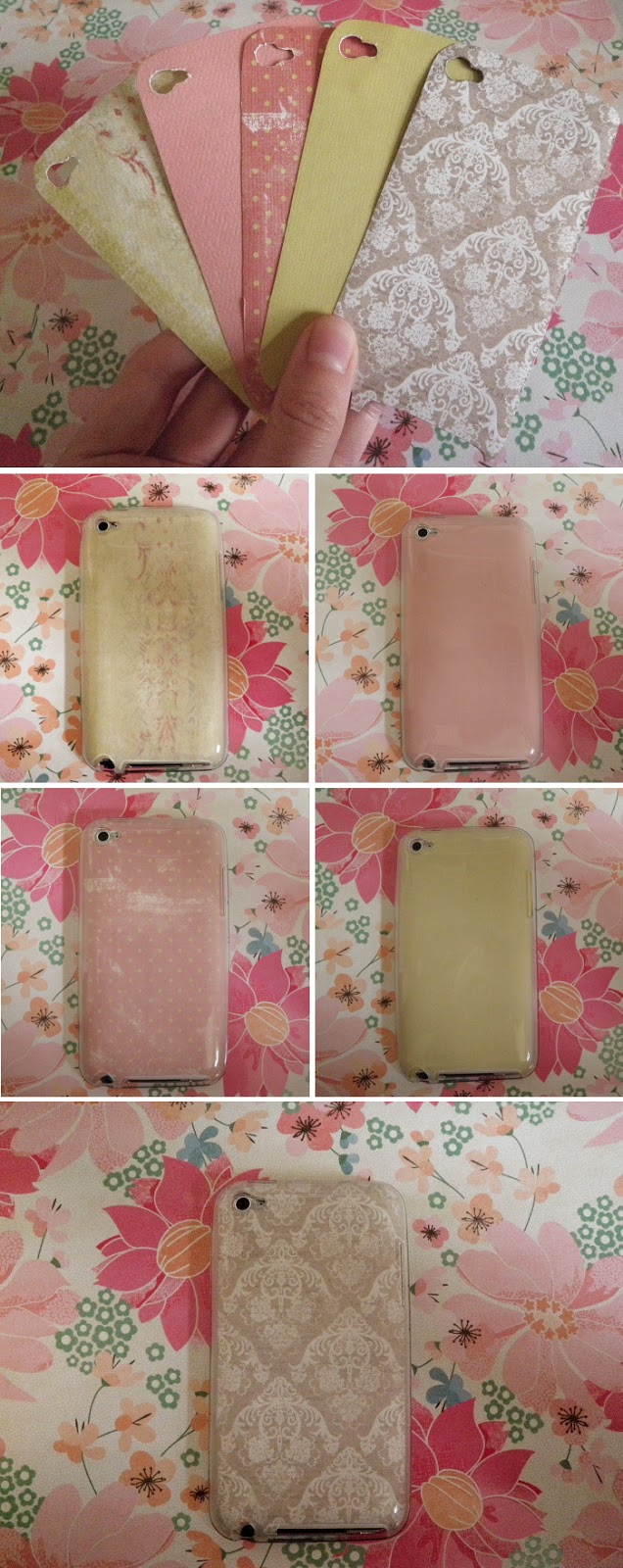
Of course, as soon as it was mine, I wanted to swap out Will's case for something more me. And more pretty. So I looked online a bit, and guess what? Nice designer cases are actually pretty expensive. Even simple ones. So, being the crafty being I am, I figured I could just make something. I found a great deal on a clear case ($2.00 and free shipping, yes please) and ordered it with the intention of doing something like this, but as soon as I sat down to make it I thought, "As pretty as this is going to be, I'll probably still get bored of it in a week." So I made my designer case changeable. And it was so easy peasy. See how I made it below.

1. What you'll need: a clear iPod or iPhone case (I got mine from this website), scrapbook/craft paper, a pencil, fine-point scissors, an exacto-knife, mod podge and a paint brush (both optional).
2. Begin by making a stencil. This will save you from making mistakes on your pretty paper and help you get an accurate fit. Use a lightweight paper to do this, like printer paper. Place the clear case down onto the paper and trace around it. Cut out the traced shape.
3. Slide your cut stencil into your clear case. Hold it flat against the back with your hand and trace the areas you will need to cut out, like around the camera and the USB and headphone ports. Remove the stencil from the case and cut these small areas out using an exacto-knife to be precise. Trim down the sides if needed.
4. Transfer your stencil onto the scrapbook paper of your choosing. Cut out around the image. Tip: Although I traced the smaller areas to cut out, like around the camera, I placed each piece inside the case before cutting those areas just to be extra sure that they lined up with the corresponding holes. Some paper lies differently than others when place between the case and the iPod/iPhone, so I really recommend this step if you don't want to have to start all over again.

That's it! Cut out as many different interchangeable designs and colors as you'd like.

If you would like to make the paper design permanent, simply apply the scrapbook paper to the inside of the clear case using a few coats of mod podge and let dry completly. 

This is the one I am currently using. How pretty is that paper!? I love it. But I love that if I don't love it forever I'll be able to use something new without having to buy something.